Roadnavier
Citroën DS5 / Peugeot 508 | 2010–2017 | 7" Android Screen — Wireless CarPlay & Android Auto
Citroën DS5 / Peugeot 508 | 2010–2017 | 7" Android Screen — Wireless CarPlay & Android Auto
Couldn't load pickup availability
Before you buy
Before you buy
Please confirm your vehicle year, original dashboard layout and factory audio system before ordering. If you are unsure, use the online chat button and send clear photos of your original screen and controls.
Read the full compatibility check →
Shipping & Delivery
Shipping & Delivery
Free shipping is available to most U.S. addresses.
A US$70 surcharge may apply to carrier-designated remote or extended-area addresses. We will contact you for approval before dispatch.
[Read full shipping policy →]
Warranty & Returns
Warranty & Returns
One-year limited warranty for confirmed non-human-caused hardware faults.
We provide remote diagnosis first, then replacement parts, repair or replacement where appropriate.
Returns require prior approval. Unused and uninstalled products may be returned within 30 days of delivery. Installed or used products cannot be returned because of a change of mind.
Citroën DS5 & Peugeot 508 Android Screen Upgrade
Add Wireless CarPlay, Android Auto and a modern Android system while keeping the original factory-style dashboard appearance.
1. Compatibility — Can I Install It in My Car?
This 7-inch OEM-style Android head unit is designed specifically for compatible Citroën DS5 and Peugeot 508 factory dashboards.
Compatible with Citroën DS5 models from 2010–2018.
Compatible with Peugeot 508 models using the matching factory dashboard configuration.
Unlike a universal floating display, this version follows the original factory-style dashboard design for a more integrated appearance.
2. Factory Functions Retained — What Will I Keep?
The Android system integrates with the original vehicle electronics through the vehicle-specific wiring harness and CANbus system, allowing supported factory functions to remain available after installation.
The original Denon amplifier is retained with the matching CANbus configuration.
Supported original vehicle settings remain accessible through the upgraded system.
Supported original center-console controls remain functional after installation.
Supported navigation information can continue to display through the original dashboard or Head-Up Display.
3. What You Gain — System Features
Keep the factory-style appearance while adding the smartphone connectivity and Android functions expected from a modern infotainment system.
Use Apple Maps, Google Maps, music, calls, messages, Siri and compatible iPhone apps.
Connect a compatible Android phone for navigation, music, calls and supported apps.
Run supported Android apps directly from the head unit.
Adjust the audio output using the built-in DSP sound controls.
Use navigation apps such as Google Maps and Waze directly from the Android system.
Connect your phone for Bluetooth functions and use Wi-Fi or a mobile hotspot for online Android features.
4. Installation — How Does It Install?
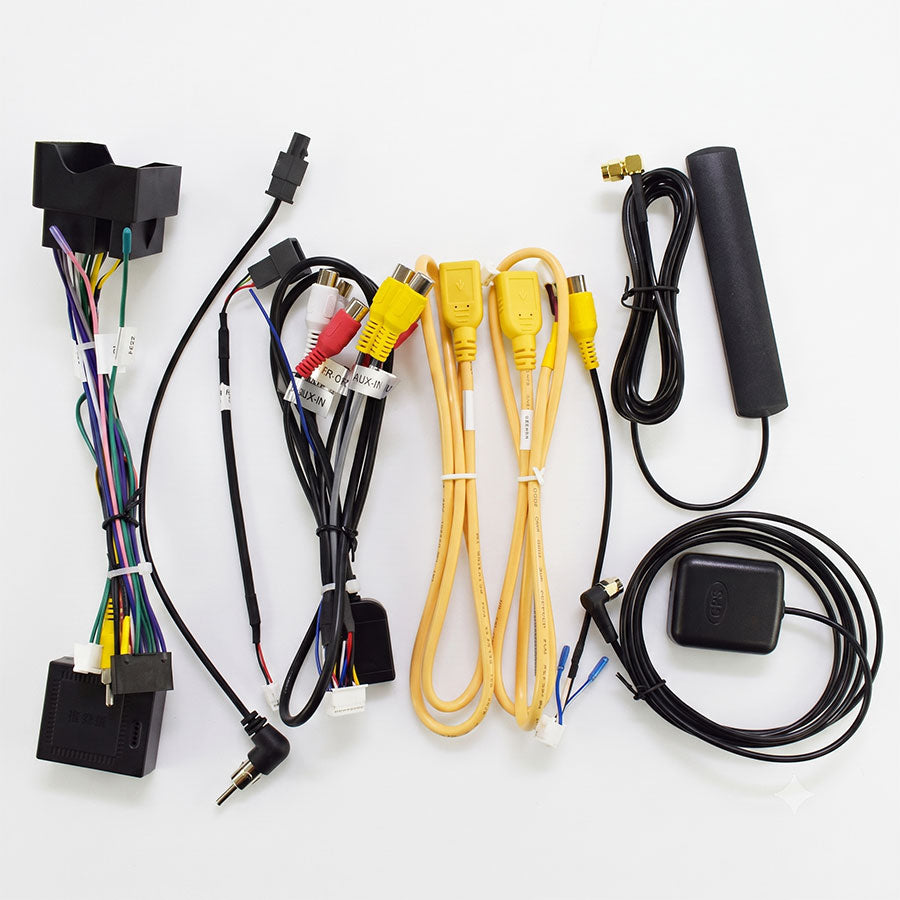
This is a vehicle-specific installation using the supplied wiring harness and CANbus decoder. No universal radio wiring setup is required.
Step 1 — Remove the Original Components
Carefully remove the necessary dashboard trim and original multimedia components to access the factory connectors.
Step 2 — Connect the Vehicle-Specific Harness
Connect the supplied Roadnavier wiring harness to the original vehicle connectors, then connect the CANbus decoder.

Step 3 — Select the Correct Vehicle Configuration
After powering on the Android system, select the correct vehicle model in the CANbus / factory settings.

Step 4 — Test Before Reassembly
Before reinstalling the dashboard trim, test the audio, original controls, vehicle information and other factory functions that apply to your vehicle.
5. Specifications — Hardware
This version is based on the UIS7865 platform with a 7-inch OEM-style display.
| Screen Size | 7-inch |
| Design | OEM / Factory Style |
| Platform | UIS7865 |
| Android Version | Android 14 |
| Processor | Octa-Core |
| RAM & Storage |
4GB + 64GB 6GB + 128GB 8GB + 128GB |
| DSP | Built-in DSP |
| Apple CarPlay | Wireless |
| Android Auto | Wireless |
| Bluetooth | Yes |
| Wi-Fi | Yes |
6. Frequently Asked Questions
Can I adjust the original analog clock from the Android screen?
No. Adjustment of the original analog clock time is currently not supported through the Android system.
Do I need to select a vehicle model after installation?
Yes. After installation, the correct vehicle configuration should be selected in the CANbus / factory settings so the system can communicate correctly with the vehicle.
Does the new screen look like an aftermarket floating display?
No. This version uses a 7-inch OEM-style design intended to integrate with the original dashboard rather than sitting above it as a large universal floating screen.
Should I test the system before reinstalling the dashboard?
Yes. Power on the unit and test audio, vehicle information, original controls and other retained functions before reinstalling all dashboard trim.
Still Not Sure It Fits Your Car?
If your dashboard or factory system does not match the configurations described above, send us your model year, a clear photo of the original dashboard, and tell us whether your vehicle has the factory Denon sound system. We can check the configuration before shipment.