Roadnavier
Internal USB TPMS — Tire Pressure Monitor for Android Head Units
Internal USB TPMS — Tire Pressure Monitor for Android Head Units
Couldn't load pickup availability
Before you buy
Before you buy
Please confirm your vehicle year, original dashboard layout and factory audio system before ordering. If you are unsure, use the online chat button and send clear photos of your original screen and controls.
Read the full compatibility check →
Shipping & Delivery
Shipping & Delivery
Free shipping is available to most U.S. addresses.
A US$70 surcharge may apply to carrier-designated remote or extended-area addresses. We will contact you for approval before dispatch.
[Read full shipping policy →]
Warranty & Returns
Warranty & Returns
One-year limited warranty for confirmed non-human-caused hardware faults.
We provide remote diagnosis first, then replacement parts, repair or replacement where appropriate.
Returns require prior approval. Unused and uninstalled products may be returned within 30 days of delivery. Installed or used products cannot be returned because of a change of mind.
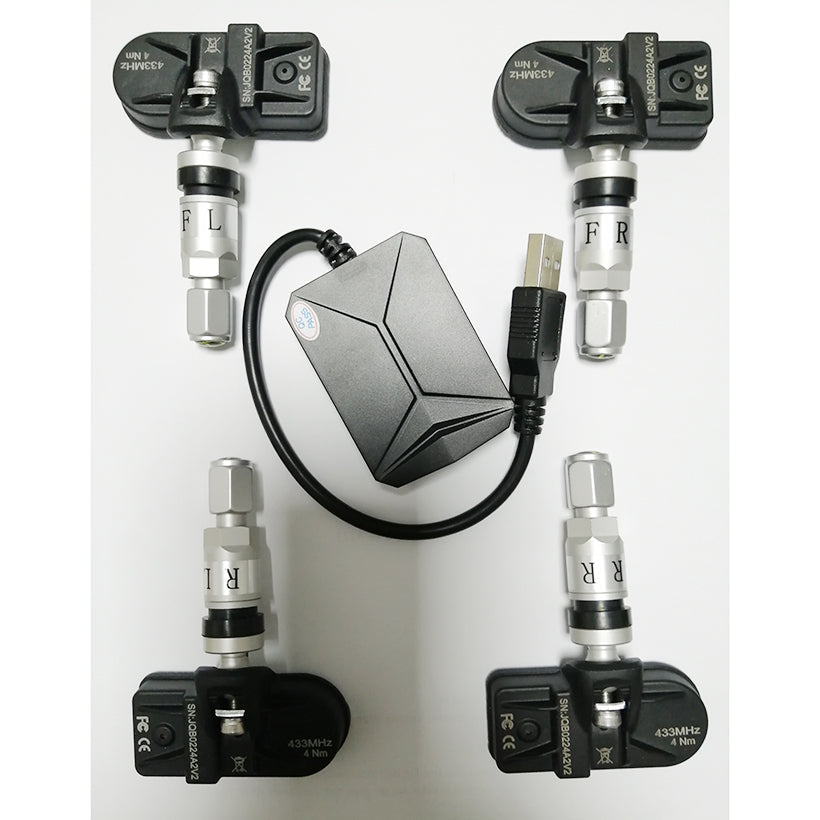
USB Internal Tire Pressure Monitoring System (TPMS)
High-precision internal rim sensors with real-time pressure & temperature monitoring natively integrated onto your Android Head Unit screen.
Internal Rim Sensor vs External Cap Sensor
Unlike cheap screw-on external caps that are vulnerable to theft, road salt, and air leaks, Roadnavier Internal Sensors are mounted securely inside the tire cavity. They offer military-grade dust/water resistance (IP67), higher thermal response accuracy, and a 5-year battery lifespan. Note: Wheel re-balancing is required during tire installation.
Engineered Performance Features
Plug & Play USB Receiver
Connects directly to any open USB port on your Android head unit (Android 4.4 - 13+). Transmits clean wireless signals (433.92 MHz) from the wheel wells without dashboard wire clutter.
Real-Time Audio-Visual Alarms
Triggers instant audio warnings and pop-up overlays for rapid pressure loss, high tire temperatures, over-pressurization, and low battery levels directly through your car's audio system.
Automotive-Grade Chipset
Powered by high-precision pressure sensing microchips and industrial CR2050 batteries designed to withstand extreme wheel rotation forces and temperature swings (-40°C to +125°C).
BAR / PSI Dual Metrics
Switch effortlessly between Bar and PSI pressure units, as well as Celsius (°C) and Fahrenheit (°F) temperature metrics inside the custom Android App settings.
Installation Workflow
- Sensor Mounting: Have a local tire shop dismount your tires, replace the standard rubber valve stems with the internal metal sensor valves, and perform wheel dynamic balancing.
- USB Integration: Plug the TPMS USB receiver module into the back of your Android head unit.
- App Setup: Install the provided TPMS APK file onto your head unit. Once launched, the app will auto-pair with the 4 wheel sensors as soon as you begin driving.
Frequently Asked Questions
Can I run this TPMS app in the background while using Google Maps or CarPlay? +
Yes. The TPMS software runs silently in the Android system background. If a pressure puncture or sudden air loss occurs, it will interrupt your current screen (such as Navigation or Wireless Apple CarPlay) with an immediate pop-up alert and audio alarm chime.
What happens when I rotate my tires? Do I need to unmount the internal sensors? +
No need to remove the tires or hardware! The included Android application features a digital Tire Position Swap function. You can re-assign wheel positions (e.g., swapping Front-Left to Rear-Right) directly on your touchscreen in seconds.
Does this work with my factory OEM original car radio? +
This system is designed specifically for aftermarket Android Head Units (Android 4.4 and above) that support APK installation via USB. It is not compatible with factory OEM screens that lack Android OS capabilities.
Need Fitment Verification for Your Android Screen?
Our automotive electronics engineers are ready to help verify head unit compatibility or assist with APK setup.
Contact Roadnavier Engineering Support