Roadnavier
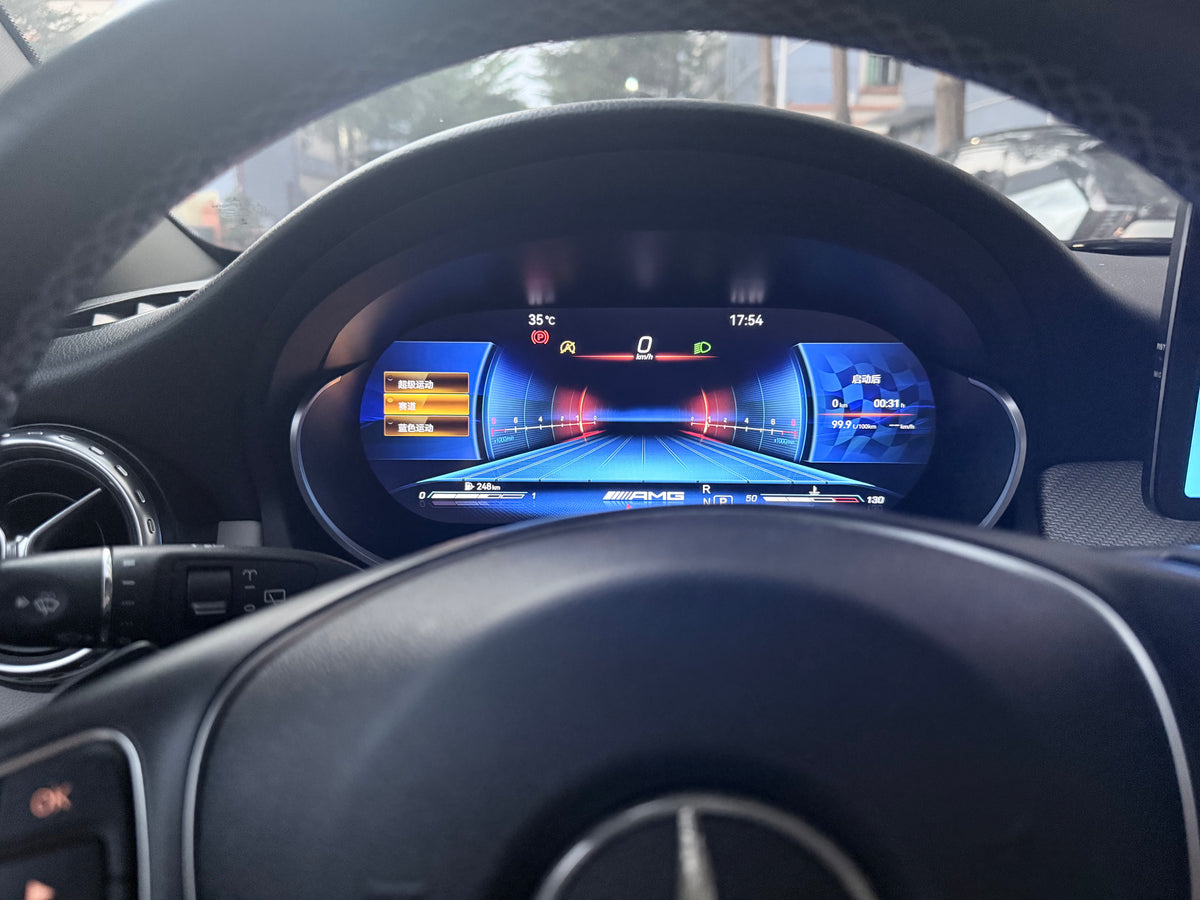
Mercedes C-Class / GLC | 2015–2019 | 12.3" Digital Cluster — Full LCD
Mercedes C-Class / GLC | 2015–2019 | 12.3" Digital Cluster — Full LCD
Couldn't load pickup availability
Before you buy
Before you buy
Please confirm your vehicle year, original dashboard layout and factory audio system before ordering. If you are unsure, use the online chat button and send clear photos of your original screen and controls.
Read the full compatibility check →
Shipping & Delivery
Shipping & Delivery
Free shipping is available to most U.S. addresses.
A US$70 surcharge may apply to carrier-designated remote or extended-area addresses. We will contact you for approval before dispatch.
[Read full shipping policy →]
Warranty & Returns
Warranty & Returns
One-year limited warranty for confirmed non-human-caused hardware faults.
We provide remote diagnosis first, then replacement parts, repair or replacement where appropriate.
Returns require prior approval. Unused and uninstalled products may be returned within 30 days of delivery. Installed or used products cannot be returned because of a change of mind.
1. Compatibility — Will It Fit My Mercedes-Benz?
Upgrade your Mercedes-Benz with the Roadnavier 12.3-inch Digital Instrument Cluster. Featuring a 1920 × 720 display, customizable dashboard interfaces, and vehicle-specific integration, this upgrade brings a modern digital cockpit experience to compatible Mercedes-Benz models.
Important: Compatibility depends on your vehicle model, original instrument cluster, and electronic system configuration. Please do not select a version based on the model year alone.
Supported Vehicle Configurations
| Vehicle Model | Supported Configuration |
|---|---|
| Mercedes-Benz GLC | GLC 5.0 / GLC 6.0 |
| Mercedes-Benz C-Class | C 5.0 / C 5.5 |
| Mercedes-Benz GLA | GLA 4.5 / GLA 5.0 |
| Mercedes-Benz CLA | CLA 4.5 / CLA 5.0 |
| Mercedes-Benz E-Class | Older E 4.5 / Older E 5.0 |
| Mercedes-Benz GLE | GLE 5.0 |
| Mercedes-Benz ML | ML 4.5 |
Configuration codes are provided by the manufacturer. Exact vehicle compatibility and the required product version must be confirmed before ordering. Availability of configurations may vary.
Before Ordering
- Identify your Mercedes-Benz model and production year.
- Check the appearance of your original instrument cluster.
- Select the corresponding vehicle and system configuration.
Not sure which version you need? Send Roadnavier a photo of your original instrument cluster for verification.
2. Factory Functions Retained — What Will I Keep?
The Roadnavier digital instrument cluster is designed to work with compatible Mercedes-Benz vehicle electronics while upgrading the appearance and capabilities of the instrument display.
Original Vehicle Information
The system supports the display of driving information, including vehicle speed and other compatible vehicle data.
Vehicle-Specific Integration
Unlike a universal standalone display, this instrument cluster is designed for selected Mercedes-Benz electronic configurations.
Factory Function Compatibility
Supported factory functions may include vehicle information displays and compatible instrument indications. Retention of steering-wheel controls, mileage information, warning indicators, driving modes, parking information, and other original functions depends on the exact vehicle configuration.
Important: If retaining a particular factory function is essential, please confirm it with Roadnavier before purchase.
3. What You Gain — Digital Dashboard Features
12.3-Inch High-Resolution Digital Display
Enjoy a modern digital instrument panel with a 12.3-inch screen and 1920 × 720 resolution, designed to refresh your Mercedes-Benz driving environment.
Multiple Dashboard UI Themes
Choose from multiple digital dashboard interface styles to personalize your driving experience. Available layouts depend on the selected configuration.
Customizable Speedometer Display
Supports three speedometer scale options:
- 260 km/h
- 280 km/h
- 320 km/h
AMG V8-Style Display
Supports AMG V8-style visual branding on compatible interfaces, adding a performance-inspired appearance to the digital dashboard.
Customizable Startup Logo
Supports logo customization for compatible software configurations.
Apple CarPlay, Android Auto & HiCar
The system supports Apple CarPlay, Android Auto, and HiCar functionality. The available connection methods and display capabilities depend on the selected vehicle and system configuration.
USB & OTA Firmware Updates
Firmware can be upgraded using a compatible USB update package or supported OTA update method when updates are available.
Multilingual Interface
Supported interface languages include English, Simplified Chinese, Traditional Chinese (Taiwan), Italian, Russian, Korean, Vietnamese, Arabic, Greek, Turkish, Spanish, German, French, and Portuguese.
Watch the Digital Cluster in Action
See the Roadnavier Mercedes-Benz digital instrument cluster in a real vehicle. Explore the digital dashboard appearance, instrument interface, and overall in-car display experience.
4. Installation — How Difficult Is It?
The Roadnavier digital instrument cluster is a vehicle-specific replacement designed for compatible Mercedes-Benz models.
Installation involves removing the original instrument cluster, connecting the replacement unit, completing the required configuration, and checking instrument operation.
Watch the Installation Guide
Watch our installation video to better understand the replacement process before starting your upgrade.
Installation Overview
- Confirm Compatibility: Verify the correct instrument cluster version for your Mercedes-Benz.
- Prepare the Vehicle: Switch off the vehicle and follow the appropriate electrical safety procedure.
- Remove the Original Cluster: Carefully remove the original instrument cluster according to the vehicle's service procedure.
- Connect the Replacement: Install the compatible digital cluster using the correct connections.
- Configure the System: Complete the necessary vehicle-specific settings.
- Test Before Reassembly: Check the speed display, warning indicators, vehicle information, and supported functions.
Is Professional Installation Recommended?
Yes. We recommend installation by a qualified automotive electronics technician familiar with Mercedes-Benz instrument systems.
Do not modify factory wiring unless specifically instructed by verified installation documentation. The installation video is a visual reference; exact procedures may vary by vehicle.
Roadnavier Installation Support
Roadnavier provides available installation documentation and technical assistance for confirmed product configurations.
If you encounter an installation or configuration issue, contact us with your vehicle details and clear photos of the connections or screen display.
5. Technical Specifications
| Product | Mercedes-Benz Digital Instrument Cluster |
|---|---|
| Screen Size | 12.3 inches |
| Resolution | 1920 × 720 |
| Operating System | Linux |
| Processor | 64-bit Quad-Core ARM Cortex-A55 |
| CPU Frequency | 1.4 GHz |
| Graphics | Integrated GPU, up to 60 fps |
| Firmware Updates | USB / OTA |
| Logo Customization | Supported |
| AMG V8-Style Badge | Supported |
| CarPlay | Supported |
| Android Auto | Supported |
| HiCar | Supported |
| Speedometer Scales | 260 / 280 / 320 km/h |
| Interface Languages | 14 languages |
| Vehicle Compatibility | Selected Mercedes-Benz configurations |
6. Frequently Asked Questions
Q1: Will this digital cluster fit my Mercedes-Benz?
Compatibility depends on your vehicle model, production year, original instrument cluster, and electronic configuration. Please check the supported configurations above before ordering.
Q2: Does the cluster support English?
Yes. English is one of the 14 supported interface languages.
Q3: Can I change the dashboard appearance?
Yes. The cluster supports multiple digital interface themes and selected display customization options.
Q4: Does it support Apple CarPlay and Android Auto?
Yes. CarPlay, Android Auto, and HiCar are listed as supported functions. The connection method and supported display features should be verified for your configuration.
Q5: Will I lose my original factory functions?
The system is designed for compatible vehicle integration. However, retention of individual factory functions depends on your Mercedes-Benz configuration. Please confirm any essential functions before ordering.
Q6: Is an installation video available?
Yes. You can watch the installation video in Section 4 above to understand the general replacement process.
Q7: Can I install it myself?
Installation requires working with vehicle electronics and instrument components. Professional installation is recommended, especially if you are unfamiliar with Mercedes-Benz dashboard disassembly or system configuration.
Q8: Can I update the system firmware?
Yes. USB and OTA firmware update methods are supported when a compatible update package is available.
Q9: Does the cluster support mileage synchronization?
Mileage handling depends on the exact vehicle and cluster configuration. Please confirm the supported procedure before ordering. Any mileage-related work must comply with applicable laws and preserve accurate vehicle history.
Q10: What should I do if the instrument cluster does not display vehicle information correctly?
First, verify that the correct vehicle configuration has been selected and that the required connections are properly installed. If the issue remains, contact Roadnavier with your vehicle details, installation photos, and a description of the problem.
7. Need Compatibility Help?
Most customers can select the correct version using the compatibility table, product options, and installation information above.
If your vehicle is not listed or you are still unsure which version to order, please send us the following information:
- Vehicle Model & Year: For example, Mercedes-Benz GLC 2017.
- Original Instrument Cluster Photo: A clear photo showing the factory dashboard.
- System Configuration: Your original system version, if known.
- Special Requirements: Any factory functions you specifically need to retain.
Our team will help you verify the appropriate product configuration before placing your order.
Check Compatibility with Roadnavier
Email: info@roadnavier.com
Customer Support: Monday–Friday, 08:00–18:00 (UTC+8)
Roadnavier — Vehicle-Specific Upgrades. Clear Compatibility. Installation Support.